
Introduction
Claude AI Guide – Artificial Intelligence has rapidly evolved from being just a chatbot to becoming a complete productivity assistant. One of the most powerful AI platforms available today is Claude AI, developed by Anthropic.
While many people compare Claude with ChatGPT, Claude offers several unique features that go beyond simple conversations. From organizing your desktop files and building applications without coding to creating reusable workflows and connecting your Gmail, Google Calendar, Slack, and other business tools—Claude AI is transforming how professionals work.
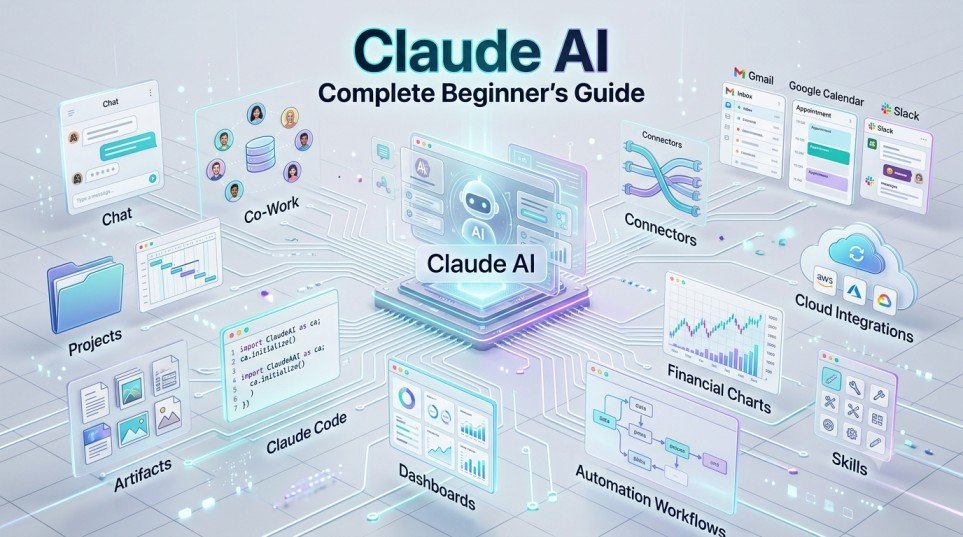
In this guide, you’ll learn everything about Claude AI, including Claude Chat, Co-Work, Claude Code, Artifacts, Projects, Skills, Connectors, Plugins, Live Dashboards, Scheduling, and much more.
Table of Contents
What is Claude AI?
Claude AI is an advanced Artificial Intelligence assistant created by Anthropic that helps users with writing, coding, research, automation, document analysis, and workflow management.
Unlike traditional AI chatbots, Claude is designed to become your digital work partner by integrating with your daily tools and automating repetitive tasks.
Claude AI consists of three major components:
- Claude Chat
- Claude Co-Work
- Claude Code
Each serves a different purpose depending on your workflow.
Claude Chat
Claude Chat works similarly to ChatGPT.
You can simply open Claude in your browser and ask questions like:
- Write emails
- Summarize documents
- Generate reports
- Explain concepts
- Create content
- Analyze PDFs
- Brainstorm ideas
The free version mainly includes Chat functionality.
Claude Desktop App
To unlock Claude’s advanced capabilities, install the Claude Desktop application.
Benefits include:
- Local computer access
- Desktop file management
- AI workflow automation
- Project management
- Claude Code
- Co-Work features
Understanding Claude Projects
Projects help organize your work.
Instead of mixing conversations together, you can create dedicated workspaces such as:
- Marketing Project
- Financial Management
- SEO Content
- Software Development
- Personal Research
Every chat, document, and instruction remains organized inside its respective project.
This improves productivity and makes future conversations much easier.
What are Claude Artifacts?
Artifacts are standalone outputs generated by Claude.
Instead of displaying everything inside a chat window, Claude can create downloadable files like:
- HTML webpages
- Dashboards
- Reports
- Documents
- Presentations
- Interactive tools
- Games
- Web applications
Artifacts can be edited, downloaded, and reused without reopening the original conversation.
Build Interactive Apps Without Coding
One of Claude’s biggest strengths is generating complete applications through simple prompts.
For example, you can ask Claude to create:
- SIP Calculator
- Budget Dashboard
- Expense Tracker
- Portfolio Analyzer
- Invoice Generator
- Habit Tracker
- Quiz Application
Claude automatically generates the required code and helps you run it—even if you have no programming experience.
Connect Your Favorite Apps
Claude supports connectors that allow it to interact with external applications.
Popular integrations include:
- Gmail
- Google Calendar
- Google Drive
- Slack
- Office 365
- Notion
- HubSpot
With these integrations, Claude can:
- Summarize emails
- Prepare email drafts
- Review calendars
- Organize meetings
- Retrieve documents
- Track business activities
Currently, Claude creates email drafts but requires user approval before sending.
Claude Skills
Skills are reusable instruction sets.
Instead of repeatedly explaining how you want content written, you can save the workflow as a Skill.
Examples include:
Newsletter Writing
Automatically follows your preferred structure.
LinkedIn Posts
Maintains your writing style every time.
SEO Articles
Generates blogs using your predefined formatting.
Research Reports
Produces reports following your standard template.
Skills significantly reduce repetitive prompting.
Plugins for Specialized Work
Claude also supports domain-specific plugins.
Examples include:
Finance
- Financial Statements
- Budget Analysis
- Variance Analysis
- Journal Entries
- Reconciliation
Human Resources
- Interview Preparation
- Offer Letters
- Employee Onboarding
- HR Documentation
Marketing
- Campaign Planning
- Content Strategy
- Brand Analysis
These plugins provide industry-specific capabilities.
Claude Co-Work
Co-Work is Claude’s productivity powerhouse.
Unlike regular chat, it can work directly on your computer.
Examples include:
- Organizing Downloads folder
- Sorting files
- Creating folders
- Managing documents
- Performing repetitive desktop tasks
Claude always asks permission before accessing your files.
Live Artifacts
Live Artifacts create real-time dashboards connected to your applications.
A dashboard may display:
- Today’s meetings
- Gmail summary
- Calendar events
- Revenue tracking
- Sales pipeline
- Slack updates
- Google Sheets reports
Everything updates automatically in one interface.
Scheduled Tasks
Claude can automate recurring activities.
Examples include:
- Morning email summaries
- AI news updates
- Portfolio tracking
- Calendar reviews
- Daily reports
Instead of remembering every task yourself, Claude performs them automatically.
Claude Dispatch
Dispatch allows interaction between your desktop and mobile device.
For example:
If an important document is saved on your laptop while you’re away, Claude can locate it and make it available through your connected workflow.
Claude Code
Claude Code is designed for software development but is equally useful for non-programmers.
You can build:
- Financial calculators
- Dashboards
- Internal business tools
- Automation software
- Web applications
- Interactive websites
Claude guides users through deployment and even helps publish projects online using services like Netlify.
Claude AI Models
Claude currently offers multiple AI models.
Haiku
Best for:
- Quick questions
- Simple writing
- Fast responses
Sonnet
Ideal for:
- Daily work
- Research
- Content creation
- Business analysis
Opus
Most powerful model for:
- Complex reasoning
- Software development
- Financial modeling
- Advanced planning
Claude AI vs ChatGPT
| Claude AI | ChatGPT |
|---|---|
| Excellent long-context understanding | Excellent general-purpose AI |
| Strong coding assistance | Better image generation |
| Powerful workflow automation | Broad plugin ecosystem |
| Desktop Co-Work features | Advanced multimodal support |
Many professionals use both together for maximum productivity.
Best Use Cases
Claude AI is ideal for:
- Content creators
- Business owners
- Software developers
- Students
- Researchers
- Marketing teams
- Financial analysts
- HR professionals
- Freelancers
Conclusion
Claude AI is much more than an AI chatbot. It functions as a complete digital workspace capable of organizing files, automating workflows, generating applications, managing projects, and integrating with your everyday tools.
Whether you’re a beginner exploring AI or a professional looking to streamline repetitive work, Claude AI provides a powerful ecosystem that can significantly improve productivity. As AI continues to evolve, mastering tools like Claude will become an essential skill for individuals and businesses alike.
Frequently Asked Questions (FAQ)
Is Claude AI free?
Yes. Claude offers a free version with chat functionality. Advanced features like Co-Work and Claude Code require a paid subscription.
What is Claude Code?
Claude Code is an AI-powered coding assistant that helps users build software, dashboards, calculators, and automation tools with minimal coding knowledge.
Can Claude organize files?
Yes. Using the desktop app and Co-Work feature, Claude can organize folders and manage files after receiving your permission.
What are Claude Skills?
Skills are reusable instruction templates that automate repetitive writing and workflow tasks.
Is Claude better than ChatGPT?
Both tools have unique strengths. Claude excels in workflow automation, long-context understanding, and productivity, while ChatGPT is particularly strong in multimodal capabilities and image generation.