
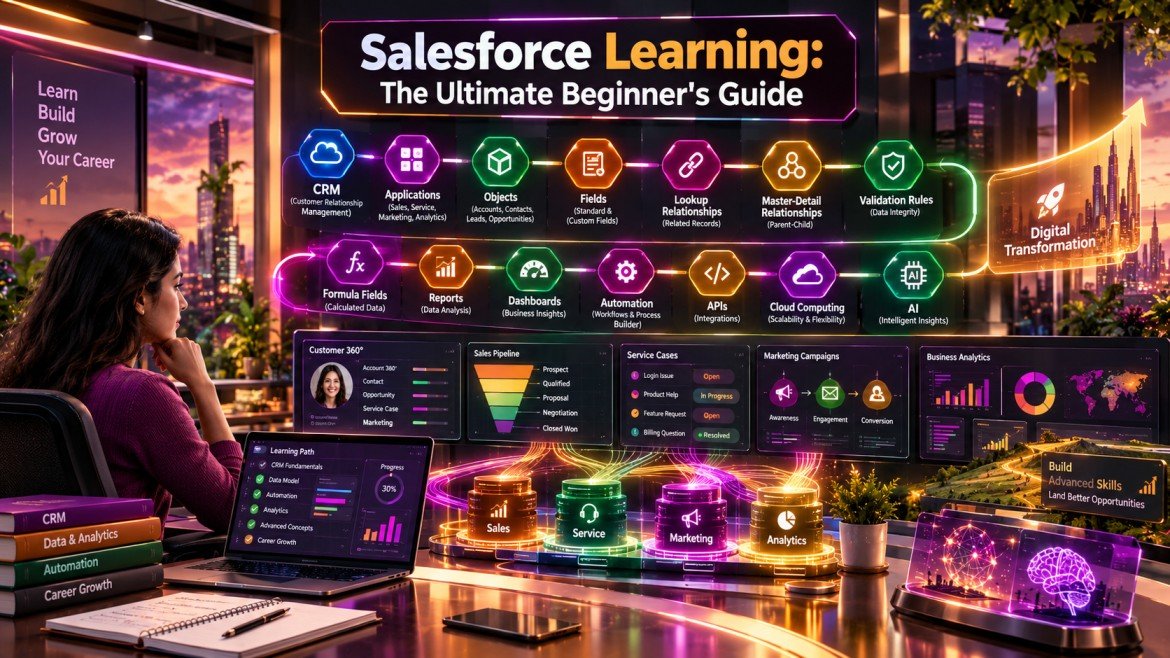
Introduction
Businesses today generate enormous amounts of customer information. Sales conversations, service requests, marketing campaigns, contact details, purchases, and customer interactions all need to be organized and accessible.
This is where Customer Relationship Management, commonly known as CRM, becomes important.
Salesforce is one of the major cloud-based CRM platforms used by organizations to manage customer relationships, sales processes, service operations, marketing activities, and industry-specific workflows.
For beginners, however, Salesforce can initially appear complicated because the platform includes applications, objects, fields, relationships, automation, security, reports, dashboards, and multiple cloud products.
The good news is that you do not need to understand everything on day one.
A structured approach to Salesforce Learning can help you start with CRM fundamentals, understand how the platform works, build simple applications, and gradually progress toward administration, development, automation, and specialized Salesforce careers.
This guide explains the essential concepts beginners should understand and provides a practical path for starting their Salesforce journey.
Table of Contents
What Is Salesforce?
Salesforce is a cloud-based CRM platform that helps organizations manage customer-related information and business processes.
Instead of maintaining disconnected spreadsheets and applications, businesses can use Salesforce to bring customer and operational data into a centralized environment.
A typical Salesforce implementation can help teams manage:
- Leads
- Customers
- Contacts
- Sales opportunities
- Service cases
- Marketing activities
- Products
- Business processes
- Reports
- Dashboards
Salesforce can also be customized to support processes specific to an organization.
Why Learn Salesforce?
There are several reasons beginners consider Salesforce as a technology and career skill.
Salesforce Connects Technology With Business
Unlike learning a programming language in isolation, Salesforce Learning often involves understanding how technology supports actual business workflows.
For example, imagine a bakery called Sweet Delights.
The bakery has:
- Hundreds of customers
- Multiple sales representatives
- Online and offline orders
- Customer complaints
- Marketing campaigns
- Different products
If customer information is maintained across separate spreadsheets, managing the business becomes difficult.
Salesforce can provide a centralized system where the business can organize customer information, sales activities, service interactions, and other processes.
Example: Sweet Delights
A salesperson could use Salesforce to:
- Create a customer record.
- Track communication with that customer.
- Record an opportunity.
- Update the sales stage.
- Monitor the expected revenue.
- View customer history.
- Generate reports for management.
The example demonstrates an important CRM principle: centralized information can make customer and business management more structured.
Understanding CRM Before Salesforce Learning
CRM stands for Customer Relationship Management.
A CRM system helps organizations manage interactions with existing and potential customers.
CRM activities can include:
- Finding potential customers
- Managing leads
- Tracking sales opportunities
- Maintaining customer information
- Managing support requests
- Conducting marketing campaigns
- Measuring customer engagement
Salesforce Learning becomes much easier when you understand why these processes exist.
You are not simply learning buttons and menus. You are learning how a business represents its customers, processes, and relationships inside a digital system.
Salesforce Architecture: What Beginners Should Know
Salesforce is designed around several important architectural principles.
Multi-Tenant Architecture
Salesforce uses a multi-tenant architecture in which infrastructure and platform services can support multiple organizations while maintaining logical separation of customer data.
For beginners, the important concept is that Salesforce is designed to operate as a scalable cloud platform rather than as software installed and maintained individually on every organization’s computer.
Metadata-Driven Architecture
Metadata describes how an application is configured.
In Salesforce, administrators can configure many aspects of an application without modifying the underlying platform code.
For example, you can define:
- Objects
- Fields
- Relationships
- Validation rules
- Page layouts
- Permissions
- Workflows and automation
This makes Salesforce highly customizable.
APIs
Salesforce provides APIs that allow external systems and applications to interact with Salesforce data and functionality.
APIs can support integrations between Salesforce and:
- Websites
- Mobile applications
- ERP systems
- Payment platforms
- Data warehouses
- Marketing platforms
- Internal business applications
Understanding APIs becomes increasingly valuable as you progress beyond beginner-level Salesforce Learning.
Salesforce Clouds You Should Know
Salesforce provides different products and cloud solutions designed for specific business functions.
Sales Cloud
Sales Cloud supports sales teams with activities such as:
- Lead management
- Opportunity management
- Account management
- Contact management
- Sales forecasting
- Pipeline tracking
Service Cloud
Service Cloud focuses on customer support and service operations.
It can help organizations manage:
- Customer cases
- Support requests
- Knowledge resources
- Service interactions
- Agent workflows
Marketing Cloud
Marketing-related Salesforce products support activities such as:
- Customer engagement
- Campaign management
- Personalized communication
- Marketing automation
- Customer journeys
Industry Solutions
Salesforce also offers solutions tailored to specific industries.
Examples include solutions for:
- Financial services
- Healthcare and life sciences
- Manufacturing
- Retail
- Education
- Public sector
Industry-focused platforms can help organizations adapt Salesforce to specialized business requirements.
Salesforce Learning: Understanding Applications
One of the practical starting points for beginners is understanding how Salesforce applications are organized.
An application provides users with access to relevant functionality and data.
For example, a sales application might contain tabs or navigation items for:
- Accounts
- Contacts
- Leads
- Opportunities
- Reports
- Dashboards
A custom application can be designed around the needs of a particular business team.
Objects and Fields in Salesforce
Objects are one of the most important concepts in Salesforce Learning.
An object can be thought of as a structure used to store a particular type of information.
For example:
Customer object
Could contain information about customers.
Product object
Could contain information about products.
Employee object
Could contain information about employees.
Salesforce includes standard objects, while organizations can also create custom objects.
What Are Fields?
Fields store individual pieces of information within an object.
For example, a Customer object could contain:
| Field | Example |
|---|---|
| Customer Name | Rahul Sharma |
| Phone | 9876543210 |
| customer@example.com | |
| City | Delhi |
| Annual Income | ₹8,00,000 |
Different field types can represent different kinds of information.
Examples include:
- Text
- Number
- Currency
- Date
- Checkbox
- Picklist
- Phone
- Formula
Understanding objects and fields creates the foundation for Salesforce configuration.
Salesforce Relationships
Businesses rarely manage isolated data.
Customers may have orders, accounts may have contacts, and opportunities may be associated with specific organizations.
Salesforce relationships connect records across objects.
Two important relationship types beginners should understand are Lookup and Master-Detail.
Lookup Relationship
A Lookup relationship creates an association between two objects.
For example:
Customer → Company
A customer record could be associated with a particular company.
Lookup relationships provide flexibility because the two records can generally maintain a degree of independence.
Master-Detail Relationship
A Master-Detail relationship creates a stronger dependency between two objects.
The detail record is closely associated with the master record.
For example:
Invoice → Customer
An invoice could be treated as a detail record associated with a customer.
The distinction between Lookup and Master-Detail relationships becomes important when designing data models.
Validation Rules
Data quality is essential for every CRM system.
Imagine a company wants all customer phone numbers to contain exactly 10 digits.
Without validation, users might enter:
- 98765
- ABC123
- 123456789012
- Random text
A validation rule can prevent inappropriate data from being saved.
Example Business Requirement
Customer phone numbers must contain 10 digits.
A validation rule can check the entered value before Salesforce accepts the record.
This illustrates how Salesforce administrators can enforce business rules without writing a complete custom application.
Formula Fields
Formula fields allow Salesforce to automatically calculate values based on other fields.
Consider a customer record containing:
- Primary Income
- Secondary Income
You could create a formula that calculates:
Total Income = Primary Income + Secondary Income
Instead of asking users to manually calculate the value, Salesforce can generate it automatically.
Why Formula Fields Matter
They can help:
- Reduce manual calculations.
- Improve consistency.
- Automate business logic.
- Display calculated information.
- Support reporting.
Formula fields are an important example of how configuration can automate business requirements.
Salesforce Reports and Dashboards
Collecting data is only useful when organizations can understand it.
Reports can help users analyze Salesforce records.
For example, a sales manager might create a report showing:
- Open opportunities
- Sales pipeline
- Expected revenue
- Opportunities by sales representative
- Closed deals
- Lead conversion
Dashboards can then present important metrics visually.
This turns CRM data into information that management can use for decision-making.
Salesforce Learning Path for Beginners
If you are starting from zero, avoid trying to learn every Salesforce feature immediately.
Follow a logical progression.
Phase 1: CRM Fundamentals
Learn:
- CRM concepts
- Customer lifecycle
- Sales processes
- Service processes
- Leads
- Accounts
- Contacts
- Opportunities
Phase 2: Salesforce Fundamentals
Understand:
- Salesforce interface
- Organizations
- Applications
- Navigation
- Records
- Objects
- Fields
- Tabs
Phase 3: Salesforce Administration
Learn:
- Users
- Profiles
- Permission sets
- Roles
- Sharing
- Page layouts
- Record types
- Validation rules
- Formula fields
Phase 4: Data Management
Study:
- Data import
- Data export
- Data quality
- Duplicate management
- Data relationships
- Security
Phase 5: Automation
Progress into:
- Flow
- Approval processes
- Business rules
- Automated notifications
- Record updates
Phase 6: Development
Once your platform fundamentals are strong, explore:
- Apex
- SOQL
- Lightning Web Components
- APIs
- Integration concepts
This progression allows you to understand the platform before moving into deeper development.
Salesforce Administrator vs Salesforce Developer
Beginners sometimes confuse these two paths.
Salesforce Administrator
Administrators typically focus more on configuring and managing Salesforce.
Their responsibilities may include:
- User management
- Security
- Configuration
- Data management
- Reports
- Dashboards
- Automation
- Business requirements
Salesforce Developer
Developers generally work more deeply with programming and custom functionality.
They may use:
- Apex
- SOQL
- Lightning Web Components
- APIs
- Integration technologies
- Development tools
There can be overlap between the roles, and career paths vary between organizations.
Salesforce Learning Through Hands-On Practice
Reading documentation is useful, but practical experimentation is essential.
Create a small fictional business such as Sweet Delights Bakery and build a CRM model around it.
Step 1: Create Business Objects
For example:
- Customer
- Product
- Order
- Employee
Step 2: Add Fields
Customer fields could include:
- Name
- Phone
- Address
- Customer Type
Step 3: Create Relationships
Connect:
Customer → Orders
and
Order → Products
Step 4: Add Validation
Require valid customer information.
Step 5: Add Formulas
Calculate:
Total Order Value = Quantity × Product Price
Step 6: Create Reports
Build reports showing:
- Total sales
- Top customers
- Popular products
- Monthly revenue
This type of project helps transform theoretical Salesforce Learning into practical experience.
Salesforce and Digital Transformation
Salesforce plays an important role in many organizations’ digital transformation initiatives.
Digital transformation is not simply about replacing paper records with software. It involves redesigning business processes through technology and data.
A CRM platform can contribute by connecting information across business teams.
For example:
Marketing → Sales → Customer Service
Marketing generates a lead.
Sales converts the lead into an opportunity.
The customer purchases a product.
Customer service manages post-sale support.
When these processes are connected through a CRM ecosystem, employees can access a more complete view of customer interactions.
Impact of Salesforce on Digital Transformation
Salesforce can contribute to:
- Centralized customer information
- Process automation
- Better collaboration
- Data-driven decision-making
- Personalized customer experiences
- Faster access to business information
- Integration with other digital systems
The actual impact depends on implementation quality, business processes, data quality, adoption, and governance.
Future Trends in Salesforce
The future of Salesforce Learning is closely connected to AI, automation, analytics, and increasingly intelligent business applications.
AI-Powered CRM
AI capabilities are becoming increasingly important within CRM platforms.
Potential use cases include:
- Sales recommendations
- Automated summaries
- Customer insights
- Predictive analysis
- Service assistance
- Content generation
Professionals who combine Salesforce knowledge with AI concepts can explore emerging opportunities.
Greater Automation
Businesses want to reduce repetitive administrative work.
Automation can help with:
- Record updates
- Notifications
- Approvals
- Data processing
- Customer workflows
Data and Analytics
CRM platforms are becoming increasingly data-centric.
Professionals may need to understand:
- Data quality
- Analytics
- Reporting
- Business intelligence
- Data integration
- Governance
Industry-Specific Salesforce Solutions
Industry-specific requirements are likely to remain important because healthcare, financial services, manufacturing, retail, and other sectors have different processes and regulatory considerations.
Integration and APIs
Organizations rarely use a single technology platform.
Salesforce professionals increasingly need to understand how CRM systems communicate with other applications through APIs and integration platforms.
Challenges in Salesforce Learning
Although Salesforce can be approachable for beginners, there are several challenges.
1. Large Ecosystem
Salesforce includes a broad collection of products and technologies.
Trying to learn everything at once can become overwhelming.
2. Frequent Platform Evolution
Cloud platforms continuously introduce new features and capabilities.
Professionals need to keep their knowledge current.
3. Understanding Business Processes
Knowing how to create an object is not enough.
You also need to understand why a business needs that object and how it fits into its workflow.
4. Data Security
CRM systems contain valuable customer information.
Understanding permissions, access controls, sharing, and data security is essential.
5. Customization Complexity
Excessive customization can create maintenance challenges.
Good Salesforce implementation requires thoughtful architecture and governance.
Career Opportunities After Salesforce Learning
Developing Salesforce skills can lead to different career paths.
Potential roles include:
- Salesforce Administrator
- Salesforce Developer
- Salesforce Business Analyst
- Salesforce Consultant
- Salesforce QA Engineer
- Salesforce Solution Architect
- Salesforce Integration Specialist
- Salesforce Technical Consultant
- CRM Analyst
Your career direction should determine which areas you prioritize.
For example, someone interested in configuration may focus heavily on administration, while a programming-oriented learner may eventually specialize in Apex and Lightning development.
How to Build a Salesforce Portfolio
A portfolio can demonstrate that you understand practical Salesforce concepts.
Create projects such as:
Project 1: Bakery CRM
Build a CRM for Sweet Delights with:
- Customer records
- Product information
- Orders
- Relationships
- Validation rules
- Formula fields
- Reports
Project 2: Sales Pipeline
Create a sales system that tracks:
- Leads
- Opportunities
- Sales stages
- Expected revenue
- Closed deals
Project 3: Customer Service System
Build a basic service workflow containing:
- Customer records
- Support cases
- Case categories
- Priority
- Resolution status
- Service reports
Document each project and explain the business problem it solves.
Common Salesforce Learning Mistakes
Trying to Learn Everything
Salesforce is a large ecosystem. Start with fundamentals and specialize later.
Memorizing Instead of Practicing
Concepts become easier to remember when you implement them in a project.
Ignoring CRM Concepts
Understanding business processes is just as important as understanding the platform.
Neglecting Security
Permissions and access control should be part of your learning from the beginning.
Avoiding Documentation
Professional Salesforce work requires the ability to research platform behavior and understand official documentation.
A Practical 90-Day Salesforce Learning Plan
Days 1–30: Fundamentals
Focus on:
- CRM basics
- Salesforce interface
- Standard objects
- Custom objects
- Fields
- Records
- Applications
- Basic security
Days 31–60: Configuration
Learn:
- Relationships
- Validation rules
- Formula fields
- Page layouts
- Reports
- Dashboards
- Data management
- Automation fundamentals
Days 61–90: Practical Project
Build a complete mini-CRM.
Include:
- Custom objects
- Custom fields
- Relationships
- Validation
- Formulas
- Automation
- Reports
- Dashboard
Then document the project and explain its business value.
Final Thoughts
Starting Salesforce Learning does not require you to master the entire Salesforce ecosystem immediately.
The most effective approach is to understand the fundamentals first: CRM concepts, objects, fields, relationships, validation rules, formula fields, security, reporting, and automation. Once those concepts become comfortable, you can move toward administration, development, integrations, analytics, AI, or industry-specific Salesforce solutions.
Salesforce also demonstrates how cloud technology can support digital transformation by connecting customer information, business processes, automation, analytics, and collaboration within a unified ecosystem.
The future of Salesforce is likely to involve greater integration between CRM, AI, automation, data, analytics, and industry-specific applications. For beginners, that makes strong foundational knowledge particularly valuable.
Start small. Build practical projects. Understand the business problem behind every configuration. Then progressively develop specialized skills.
That approach can turn Salesforce Learning from a collection of platform features into a practical technology and career skill.